

Last Updated: November 12, 2026
Quick Summary
To check a return policy online, scroll to the footer of the store's homepage and look for links such as Returns, Shipping & Returns, or Help. Search the site for "return policy" or check the product page and checkout screen, since item-level terms can differ from the default.
- Start with the footer links labeled Returns, Shipping & Returns, or Help.
- Check the product page and checkout screen, because item-level terms can differ.
- Confirm the return window, restocking fee, and who pays return shipping.
- Save a screenshot of the policy, since policies can change over time.
Table of Contents
- Why Checking a Return Policy Before You Buy Saves Time and Money
- Step-by-Step: Finding a Return Policy on Any Online Store
- How to Check Return Policies Online Amazon and Walmart
- Checklist: Key Terms to Look for in Any Return Policy
- Online Return Window and Refund Processing Time Explained
- How to Check a Return Policy Without a Receipt
- Handling Unclear or Conflicting Policies and Marketplace Sellers
- Your Next Step: Build a Quick Return Check Before Every Order
- Frequently Asked Questions
Why Checking a Return Policy Before You Buy Saves Time and Money
Most shoppers never read the return policy until they need it. That is when it costs them. Shoppers who check a store's return terms first can avoid surprise restocking fees, missed deadlines, and items they cannot send back. Knowing how to check return policies online takes about two minutes, and it can save you a lot more than that.
Returns are a big deal for online buyers. A store's policy tells you how long you have, what condition the item must be in, and who pays for shipping. Federal Trade Commission guidance on consumer shopping rights explains that the store must state its return terms clearly, which makes the policy a useful tool for you.
Here is why it matters:
- You avoid missed deadlines. Many stores give 30 days or fewer.
- You avoid fees you did not expect. Some charge to ship items back.
- You avoid buying something you cannot return. Final-sale items are common.
- You know your options before you pay. You can compare stores with confidence.
A quick policy check before you order helps you buy with confidence. Stores set their own rules, so the details differ from one site to the next.
Step-by-Step: Finding a Return Policy on Any Online Store
Most stores place their return policy in the same few spots. Start with the footer at the bottom of the homepage. Look for links labeled "Returns," "Returns & Exchanges," "Shipping & Returns," or "Help."
Follow these steps:
- Scroll to the footer. Check the links at the very bottom of the homepage.
- Look for a help or FAQ menu. Many stores hide policies under "Customer Service."
- Search the site. Type "return policy" into the search bar.
- Check the product page. Some items list return limits right under the price.
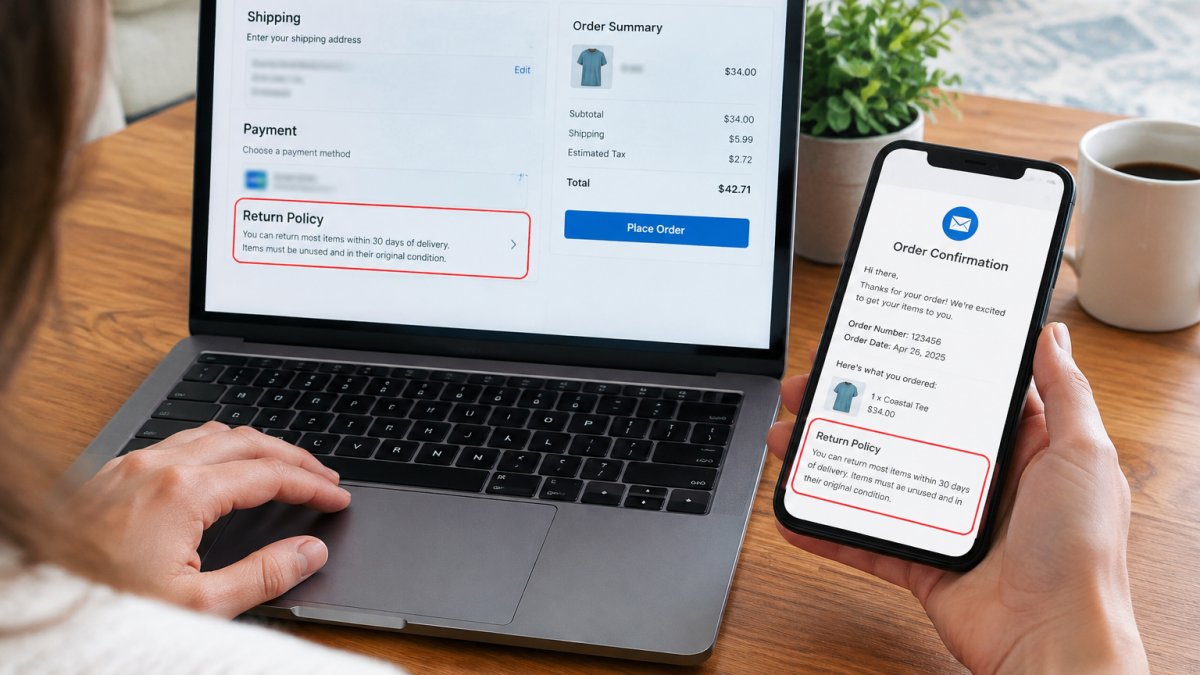
- Read the checkout page. Stores often repeat key terms before you pay.
Once you find the page, save a screenshot or copy the key details. Policies can change, so a saved copy helps if there is a dispute later.
Watch out: A policy on the homepage may not cover special orders or sale items. Always confirm the terms for the exact item you plan to buy.
How to Check Return Policies Online Amazon and Walmart
Large marketplaces run their own return systems, and the policy you see on the homepage is only the default. You can browse the trucker caps and other apparel this store sells while you check its return terms. The terms that apply to your order can change based on the item category, the seller, and the condition of the product.

Amazon
- Open the product page and scroll to the "Returns" or "Return policy" section near the price and shipping details. This is where item-specific windows appear, such as the shorter window that often applies to electronics or the extended window that sometimes applies during the holiday season.
- At checkout, review the order summary. Amazon repeats key terms here, including whether the item ships from Amazon or from a third-party seller.
- After purchase, go to Returns & Orders in your account menu, select the order, and choose Return or replace items. The Returns Center shows the eligible return window for that specific order and flags items that cannot be returned.
Walmart
- Scroll to the footer of the homepage and open Returns & Refunds under the Customer Service column. The page lists standard windows by category, such as 90 days for most general merchandise and shorter windows for electronics and wireless devices.
- On the product page, look for the "Return policy" link under the price. Walmart shows item-level exceptions here, including final-sale and marketplace items.
- In your account, open Purchase History, select the order, and choose Start a return. The portal confirms eligibility and shows whether the item must go back by mail or can be returned to a store.
Third-party sellers on both marketplaces
Marketplace sellers can set their own windows, restocking fees, and condition rules, and those terms can be stricter than the marketplace default. Before you buy, open the seller's storefront from the product page and look for a "Returns" or "Seller policies" link. If the seller's terms and the marketplace terms disagree, the marketplace's buyer protection usually sets a floor, but the seller's policy can still add requirements such as original packaging or a return authorization number.
Watch out: A product page may show the marketplace default while the checkout screen shows the seller's stricter terms. Always confirm the policy at checkout, not just on the listing.
Federal Trade Commission guidance on online shopping and return policies
Checklist: Key Terms to Look for in Any Return Policy
Use this checklist to compare stores quickly:
- Return window: How many days you have to send the item back
- Condition rules: Whether tags, packaging, or wear matter
- Restocking fee: Any percentage taken off your refund
- Shipping costs: Who pays for the return label
- Refund method: Original payment, store credit, or gift card
- Final-sale items: Products that cannot be returned at all
- Exchange options: Whether you can swap sizes instead
- Deadlines for requests: When you must start the return
Keep this list handy. Comparing the same terms across stores makes the best choice clear.
Use these key terms to compare return policies quickly across stores:
| Term | What to check | Why it matters |
|---|---|---|
| Return window | Days you have to send the item back | Missed deadlines mean no refund |
| Condition rules | Whether tags, packaging, or wear matter | Affects whether a return is accepted |
| Restocking fee | Percentage taken off your refund | Reduces the amount you get back |
| Shipping costs | Who pays for the return label | Can add unexpected cost |
| Refund method | Original payment, store credit, or gift card | Determines how you get your money |
| Final-sale items | Products that cannot be returned | These items may not be returnable at all |
| Exchange options | Whether you can swap sizes | A swap may be easier than a refund |
| Request deadline | When you must start the return | Starting late can forfeit your return |
Online Return Window and Refund Processing Time Explained
The return window is the time you have to start a return, while refund processing time is how long the store takes to pay you back after it receives the item. These are two separate clocks.
Many stores count the window from the delivery date, not the purchase date. Check which one applies. Refunds can take several business days after the store receives your package, and the money may take longer to appear on your card.
How to Check a Return Policy Without a Receipt
You can often return an online order without a paper receipt. Log in to your account and open your order history. Most stores show the order number, date, and items there. Use that order number to start a return online.
If you bought as a guest, check your confirmation email. It usually includes the order number. Without an order number, some stores will look up the purchase by email address or card used.
Watch out: Gift orders may not show prices or purchase details to the recipient. Ask the sender for the order number first.
Handling Unclear or Conflicting Policies and Marketplace Sellers
Policy pages contradict each other more often than shoppers expect. A product page may promise 30 days, the checkout screen may reference a 14-day window for that category, and the order confirmation may say something else again.
Step 1: Capture the terms at purchase.
Before you pay, take a screenshot of the product page return section, the checkout screen, and the order confirmation email. Include the URL bar and the date in the screenshot.
Step 2: Identify which document controls.
A common pattern is that the order confirmation email contains the terms that apply, because it reflects what the store presented at checkout. If the confirmation is silent, the checkout screen is the next best evidence.
Step 3: Ask support in writing and ask a specific question.
Step 4: Escalate through the right channel.
For a marketplace order, open a case through the marketplace's buyer protection program rather than negotiating only with the seller. Marketplaces typically require you to contact the seller first, but the case record becomes the evidence trail if the seller does not respond.
Step 5: Know when to stop.
If the store will not confirm the terms in writing and the policy pages conflict, treat the purchase as final sale. That is the only assumption that protects you from a surprise denial.
Watch out: A customer service representative may quote a policy that differs from the written page. The written answer in your account is stronger evidence than a phone conversation, so ask for confirmation by email or chat.
Your Next Step: Build a Quick Return Check Before Every Order
Make the return check a habit. Before you pay, spend two minutes on the policy and the checklist above. That small step can keep your money and your time safe.
Shop SUNGRY's beach shirts, fishing tees, and lake-inspired apparel with a clear view of the terms. Our team is always glad to answer questions about sizing and returns before you order.
Frequently Asked Questions
How do I check a return policy online?
Start on the retailer's website and scroll to the footer, where most stores link to a page labeled Returns, Return Policy, or Returns & Exchanges. You can also search the store's name with the words return policy in a search engine. Before buying, look for the return window in days, the condition items must be in, whether original packaging is required, and who pays return shipping. If the product page lists a different window or exclusion, the item-specific terms usually take precedence, so check both. Save a screenshot of the policy page with the date so you have a record if the terms change later.
How do I check a return policy on Amazon or Walmart?
On Amazon, open the product page and look for the Returns section near the price, or go to Your Orders and select the item to see its return eligibility and deadline. Many items sold by third-party sellers follow that seller's policy instead of the marketplace default, so check the seller name on the listing. On Walmart, the return policy appears on the product page and in the Returns Center, which shows eligibility and any fees for each order. In both cases, confirm whether the item is sold by the retailer or a marketplace seller before you rely on the policy.
Can I return an online purchase without a receipt?
Often yes, but the process depends on the retailer. Most stores can look up the purchase with your order number, the email address used at checkout, or the card used to pay. Without any of those, you may only receive store credit or an exchange, or the return may be refused. Check the return policy for language about proof of purchase before you buy, and keep your confirmation email, since it usually contains the order number you will need.
How long do online returns take to process?
Most retailers give a return window of 30 to 90 days from delivery or purchase, and some holiday purchases have extended windows. Once a return arrives at the warehouse, refunds commonly take 3 to 10 business days to appear, though the bank or card issuer may need several more days to post the credit. Check the policy for the exact processing time and whether the refund goes to the original payment method, store credit, or a gift card. Tracking the return shipment and noting the date it was delivered helps you measure the timeline.
